


Decor AI: AI Interior Design
4.613.00 Reviews
App Specs
- Version
- 3.6.1
- Updated On
- License
- Free
- Downloads
- 50,000+
- Developer
- Rocket Digital Apps
- Categories
- House & Home
- Platform
- Android
Screenshots
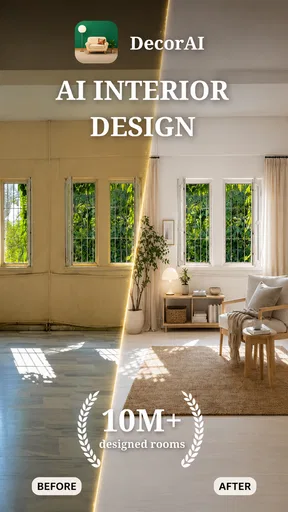
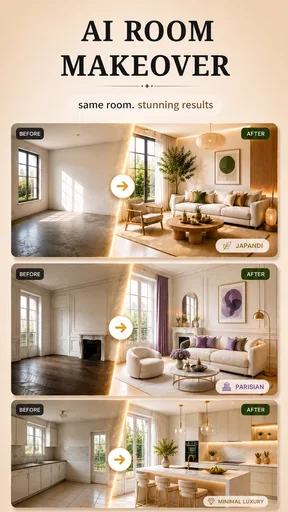
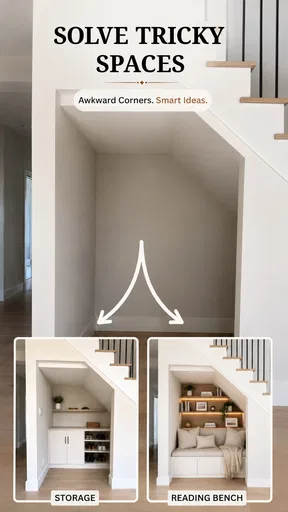
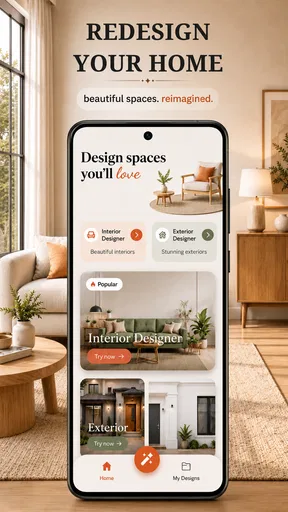
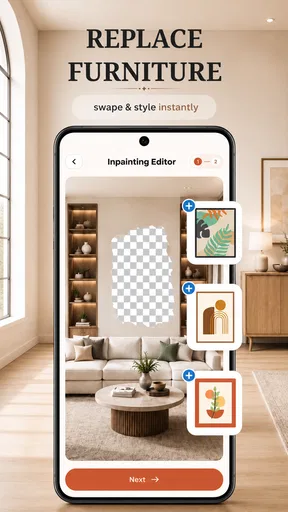
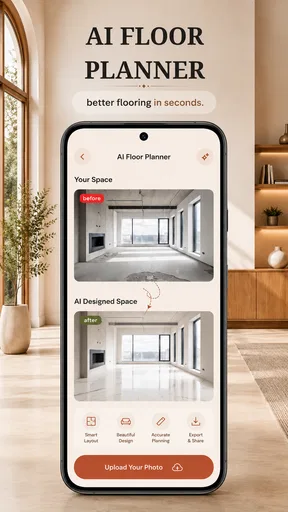
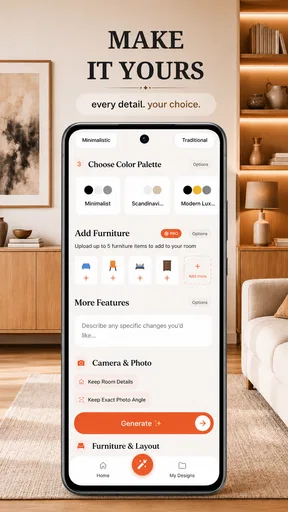
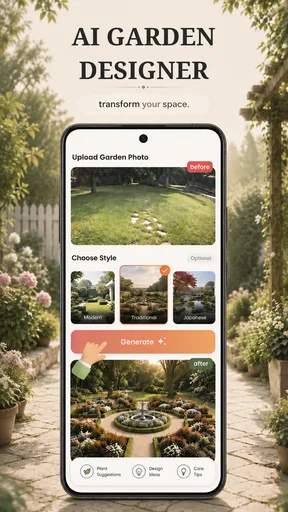
 Analysis by AppCompare
I like the idea of judging a room from a fresh angle before moving furniture or buying anything, and Decor AI is aimed squarely at that moment. It is a free home-design app from Rocket Digital Apps, rated 4.7 on average by around 1.5K ratings, with over 10K installs. Its Everyone age rating makes it broadly suitable, while optional in-app purchases range from $5.99 to $74.99 per item. I see it as a visual brainstorming tool: useful for exploring a direction, but not a substitute for measuring a room or planning a renovation.
Reading the room, and the app
The starting point is a photo of your space, so the quality of that image matters as much as the design prompt you have in mind. I’d take the picture in steady, even light, include the main walls and furniture, and avoid an angle that makes the room look unusually wide or cramped. That gives the app a more helpful visual reference and makes it easier for me to judge whether a suggested change belongs in my actual room.
The app’s version 3.2.9 requires Android 7.0 or later. Its central workflow is visual, which can be easier to understand than a long written guide: you look at the room and consider a proposed direction. But a visual result can still be difficult to inspect if you rely on larger text, magnification, or a screen reader. I would treat the preview as something to explore at your own pace, rather than assuming that every design detail will be equally clear to every user.
Useful for visual planning, with practical limits
One helpful way to use an AI room redesign is to compare broad choices rather than expect it to settle every detail. For example, if I’m unsure whether a bedroom should feel lighter or more dramatic, I can use a room image to explore the mood before changing paint or shopping. I’d keep the same photo and vary one decision at a time, such as the overall style or color direction. That makes the comparison more meaningful than changing several things and then trying to work out which one improved the result.
This is also where the app differs from familiar alternatives. A saved-image board is better for collecting real products and references; a room-planning tool with manual measurements is better for checking whether a sofa can fit through a doorway or leave enough walking space. Decor AI’s appeal is the quick visual interpretation of a room, not precise architectural planning. I’d use it to generate ideas, then verify dimensions and product details separately before spending money.
When everyday circumstances affect the experience
A realistic use case is planning a living room refresh after work, when there is no time or energy to draw a floor plan. I could photograph the room, explore a different look, and save the strongest direction to discuss with someone at home. That is a low-pressure first step: it can help turn a vague “this room feels tired” into a clearer conversation about color, furniture, and atmosphere.
There are trade-offs. Photos can include personal belongings, and room images may reveal more about a home than a user intends to share. I’d choose a picture that shows what the design task requires without unnecessarily including people, documents, or private details. If a room is dim, crowded, or partly hidden, I’d also be cautious about treating the visual result as a dependable reading of its layout; the image is an input, not a measurement.
Worth Reading Before You Choose

Flipboard Shows What News Apps Must Do Beyond the Feed

Switching to Android Auto Means Rethinking Your Driving Routine

Google Calendar Makes a Crowded Week Easier to Manage

Ludo King Makes the Most of the Minutes Between Plans

Baby Panda World Brings Quick Play to Modern Phones, but Its Game Library Feels Busy

ESPN’s Live Game View Makes Following Close Games Easier
Who is likely to get the most from it?
I’d recommend this kind of app to renters deciding how to refresh a room without committing to major work, homeowners looking for a starting point, and anyone who finds it easier to react to a picture than to imagine a finished space from a list of ideas. It can also help a household compare preferences: one person can point to a look they like, while another can explain what feels too busy or too dark.
I would skip it if my main need were exact furniture fit, a contractor-ready plan, or a guarantee that a generated look can be recreated with available products. People who find photo-based interfaces tiring may also prefer a simpler text-led inspiration source or a design professional who can talk through the room directly. The right choice depends on whether the goal is inspiration or a decision that must be accurate down to the last measurement.
Transforming Spaces with a Tap
Imagine walking into a room and instantly knowing what colors, furniture, and accents would turn it into a Pinterest-worthy space. That's the magic of Decor AI. This app uses artificial intelligence to analyze your room's layout and suggest design changes that align with your taste. It’s like having a professional designer in your pocket, minus the hefty consultation fees!
Getting Started: Easy Peasy
First things first, the setup is a breeze. Once you download the app and sign up, you’re guided through a simple process where you snap a photo of your room. The app’s sleek interface walks you through every step, ensuring even tech novices can navigate it without breaking a sweat. Within seconds, you’re ready to start transforming your space.
Features That Wow
One of the standout features is the Style Gallery. Here, you can browse through a curated selection of styles, from minimalist chic to boho vibes. Each style comes with a detailed explanation of its elements and how to incorporate them into your design, providing inspiration at your fingertips.
The app also offers a 3D Visualization feature. Trust me, seeing your room in 3D with different design elements is a game changer. It’s like having a virtual reality experience, without needing any fancy equipment. You can rotate and zoom in on different aspects, giving you a realistic preview of how your space will look post-makeover.
Personalized Recommendations
One size doesn’t fit all, and Decor AI knows it. The app uses AI to tailor recommendations based on your preferences and existing furniture. It’s like having a designer who truly gets you, understanding your style quirks and working within your budget. Plus, the app’s AI learns over time, refining its suggestions the more you use it.
Shopping Made Simple
Once you’ve settled on a design, the app makes shopping for the necessary items a breeze. With integrated links to online stores, you can purchase furniture and decor straight from your phone. No more endless scrolling through websites or having to guess if a piece will fit with your design vision. The app does the heavy lifting for you, ensuring you can focus on creating a space you love.
Community and Sharing
If you’re someone who loves feedback, you’ll appreciate the community aspect of the app. You can share your designs with friends or even the larger Decor AI community. It’s a fantastic way to get input or simply show off your newfound design skills. The app also hosts design challenges and showcases top designs, offering inspiration and a bit of friendly competition.
Final Thoughts
In a world where our living spaces have become our sanctuaries, Decor AI: AI Interior Design is a must-have tool for anyone looking to elevate their home aesthetics. Whether you're a design newbie or a seasoned decor enthusiast, this app offers something for everyone. Its intuitive interface, personalized recommendations, and seamless shopping integration make it a standout choice in the crowded world of design apps.
So, if you’re ready to transform your living space from drab to fab, give Decor AI a whirl. Who knew redecorating could be as easy as tapping a screen?
A more grounded way to make the final call
For me, the best result is not necessarily the most dramatic one. A convincing room image can make a bold color or a different furniture arrangement feel settled, even though the practical questions remain: does the route to the door stay clear, can a chair still be pulled out, and will the room work for everyone who uses it? I’d compare the design with the room as it is, checking circulation and access before copying any visual idea.
That matters especially when a room has to serve several purposes. A small living room may also be a workspace, a play area, or a place to rest. I’d use a generated look to discuss the atmosphere, then list the activities the room must support before moving or replacing furniture. A pretty preview is useful only if the everyday route through the space remains comfortable.
Small workflow choices that improve the comparison
Rather than photograph the room once and accept the first appealing direction, I’d treat the image as a baseline. Clear temporary clutter only if it is not part of the room’s normal use; otherwise the result may suggest a space that does not reflect daily life. Take the photo from a position you can repeat, and keep the lighting similar when comparing options. This helps separate design changes from differences caused by framing or shadows.
I’d also keep a short note beside each favorite result: what I like, what seems impractical, and what I would need to check in person. “Warmer feeling, but uncertain about the dark wall” is more useful than simply saving a picture. This turns the app into a decision aid rather than a gallery of attractive images, and it makes it easier to explain preferences to a partner, housemate, or decorator.
Costs, confidence, and sensible expectations
The app is free to download, but in-app purchases are available, so I’d look carefully at any purchase screen and decide whether a paid option genuinely helps with the task I’m trying to complete. I would not pay just because I felt rushed to finish a room plan. A useful first test is whether the basic experience gives me enough direction to identify a style or color preference; if it does not, spending more may not solve the underlying uncertainty about what I want.
AI-generated interiors are best treated as suggestions, not promises about exact materials, dimensions, lighting, or what a shop can supply. Even a polished visualization can leave out the awkward detail that matters in a real home: a radiator, uneven wall, narrow passage, or furniture that must stay. Before ordering anything, I’d measure the space myself and check the item’s real dimensions and finish. That extra step is less exciting than browsing a preview, but it is the one that prevents an attractive idea from becoming an expensive mismatch.
An inclusive verdict for a visual design tool
Overall, I find Decor AI most useful when I want a quick visual starting point and can judge the result with my own eyes, while keeping practical checks outside the app. Its photo-led approach may suit people who prefer seeing possibilities over reading long decorating advice, but it may be less comfortable for someone who needs strong text accessibility, reduced visual complexity, or a fully hands-free way to navigate. I would not assume that a general age rating guarantees an equally easy experience for every ability or situation.
My recommendation is therefore specific: try it if you want to explore a room’s look before making low-risk changes, and use the preview to sharpen your preferences. Choose measured planning software or one-to-one design help when accuracy, accessibility accommodations, or construction decisions are central. Used with that distinction in mind, Decor AI: AI Interior Design can make the first conversation about a room easier without pretending that an attractive image is the finished plan.
Pros
- User-friendly interface for easy navigation.
- Wide variety of design styles available.
- Real-time design previews enhance experience.
- Supports both 2D and 3D design modes.
- Integrates well with social media for sharing.
Cons
- Limited free features; many are paid.
- Occasional lag in loading design elements.
- Requires internet connection for full functionality.
- Some features locked behind subscription.
- Ads can be intrusive in the free version.
FAQs for Decor AI: AI Interior Design
What is Decor AI: AI Interior Design?
Decor AI: AI Interior Design is an innovative app that uses artificial intelligence to help users plan and visualize home interior designs. By uploading a photo of your room, the app provides personalized suggestions and renders various design options to inspire and guide your decorating choices.
How does Decor AI generate design ideas?
Decor AI utilizes advanced algorithms and AI technology to analyze your space's layout, lighting, and style preferences. It then generates tailored design suggestions, including furniture arrangements, color schemes, and decor elements, providing a realistic visualization of potential transformations for your room.
Is Decor AI suitable for professional interior designers?
Yes, Decor AI is designed to assist both amateur decorators and professional interior designers. Professionals can benefit from the app's ability to quickly visualize and experiment with different design concepts, saving time and enhancing creative possibilities with the help of AI-driven insights.
Can I purchase furniture directly through Decor AI?
While Decor AI primarily focuses on providing design ideas and visualizations, it may partner with retailers to offer links or purchasing options for suggested furniture and decor items. Users should check the app for any integrated shopping features or external links to purchase items.
What devices are compatible with Decor AI: AI Interior Design?
Decor AI is available for both Android and iOS devices. Users can download the app from the Google Play Store or Apple App Store. Ensure that your device meets the app's minimum requirements for the best experience, and check for any updates to maintain compatibility and access new features.


